LZ in OpenZL
Starting in v0.2.0, OpenZL ships its own native LZ engine, which can offer better performance than using Zstandard or LZ4. While OpenZL's main target is structured data, LZ is still a core backend compression technique used in nearly all compression graphs, applied after the higher-order structure has been removed. Additionally, there are use cases where the structure of the data is unknown, and LZ is a good default.
There are two major reasons why OpenZL's native LZ engine can offer better performance than Zstandard or LZ4:
Wire format: We can offer better performance when not constrained by the wire format. We've spent the last decade optimizing Zstandard & LZ4, but some optimization opportunities require changing the wire format, so they couldn't be applied; now we have an opportunity to do so in OpenZL. Additionally, OpenZL can take advantage of new advancements in compression technology, specifically PivCo Huffman by Marcin Żukowski. These optimizations together allow us to offer decompression speeds over 2x faster than Zstandard at comparable compression ratio.
Modular graph-based design: OpenZL's modular graph-based design allows us to swap the backend entropy compressors to best fit the data being compressed. The backend entropy compressors play a large role in the compression ratio, compression speed, and decompression speed tradeoff; OpenZL's flexibility allows us to fine-tune this tradeoff. OpenZL's trainer allows users to build a Pareto frontier of LZ compressors leveraging this modularity to offer a wide range of optimal tradeoffs tuned to their data.
Performance
OpenZL currently offers LZ compression configurations that map to Zstandard levels 1 through 7, as well as configurations that compete with LZ4 by turning off the backend entropy compression. We expect to continue to expand the compression configurations supported to cover Zstandard's entire compression level range and more.
OpenZL offers over 2x faster decompression speed compared to Zstandard across the entire compression level range, and offers up to 50% faster decompression compared to LZ4.
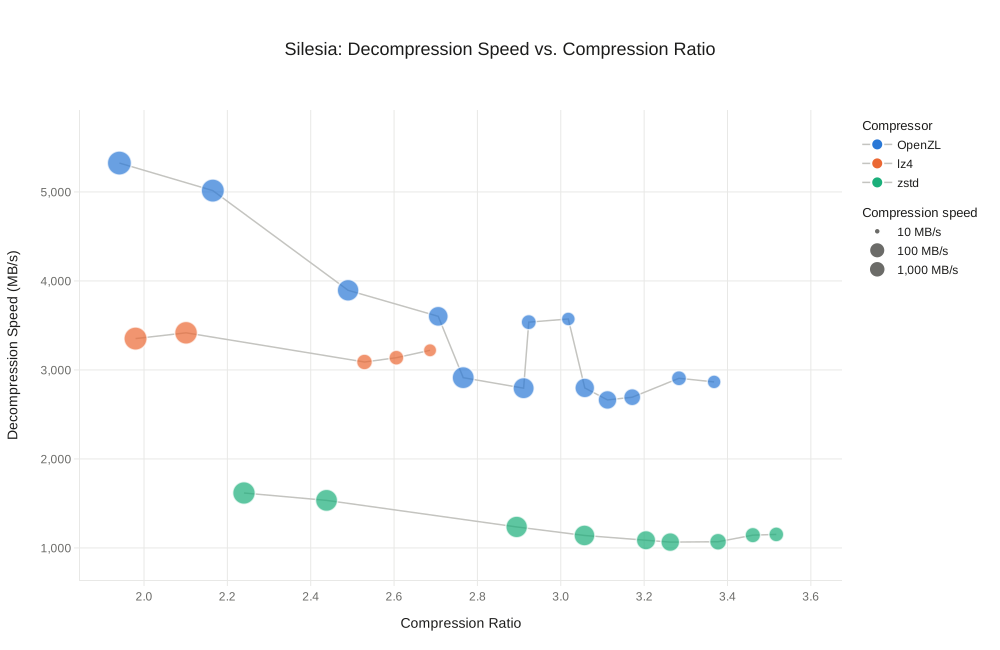
Details
| Compressor | Compression Ratio | Compression Speed (MB/s) | Decompression Speed (MB/s) |
|---|---|---|---|
| OpenZL clvl=-3 | 1.94 | 771 | 5,324 |
| OpenZL clvl=-1 | 2.17 | 622 | 5,015 |
| OpenZL clvl=2,dlvl=1 | 2.49 | 430 | 3,895 |
| OpenZL clvl=3,dlvl=1 | 2.71 | 281 | 3,602 |
| OpenZL clvl=1 | 2.77 | 474 | 2,913 |
| OpenZL clvl=2 | 2.91 | 381 | 2,795 |
| OpenZL clvl=6,dlvl=1 | 2.92 | 88 | 3,537 |
| OpenZL clvl=7,dlvl=1 | 3.02 | 65 | 3,572 |
| OpenZL clvl=3 | 3.06 | 264 | 2,798 |
| OpenZL clvl=4 | 3.11 | 211 | 2,663 |
| OpenZL clvl=5 | 3.17 | 139 | 2,694 |
| OpenZL clvl=6 | 3.28 | 87 | 2,906 |
| OpenZL clvl=7 | 3.37 | 64 | 2,865 |
| Zstd lvl=-3 | 2.24 | 534 | 1,617 |
| Zstd lvl=-1 | 2.44 | 474 | 1,534 |
| Zstd lvl=1 | 2.89 | 424 | 1,236 |
| Zstd lvl=2 | 3.06 | 353 | 1,140 |
| Zstd lvl=3 | 3.20 | 243 | 1,086 |
| Zstd lvl=4 | 3.26 | 211 | 1,066 |
| Zstd lvl=5 | 3.38 | 133 | 1,069 |
| Zstd lvl=6 | 3.46 | 95 | 1,144 |
| Zstd lvl=7 | 3.52 | 84 | 1,152 |
| LZ4 lvl=-3 | 1.98 | 618 | 3,352 |
| LZ4 lvl=1 | 2.10 | 561 | 3,417 |
| LZ4 lvl=2 | 2.53 | 103 | 3,089 |
| LZ4 lvl=3 | 2.61 | 84 | 3,137 |
| LZ4 lvl=5 | 2.69 | 56 | 3,221 |
Benchmarks run with OpenZL v0.3.0 compiled with clang-21.1.0 on an AMD Turin machine.
clvl denotes the compression level (controlling compression speed), and dlvl=1 denotes that the decompression level was set to target faster decompression speed rather than being left as the default value.
Note that OpenZL generally compresses slightly worse than Zstandard at higher compression levels. This is largely because OpenZL does not currently support repeat offsets. However, OpenZL's modular design will allow us to plug in repeat offset support when we develop the codec, and only use it when it matters.
Training
OpenZL ships a trainer to automatically build and tune compressors to best fit the data shape they will be compressing. We've added an LZ trainer that tunes both compression search strategy parameters and backend entropy compressors to offer a Pareto frontier of compressors that offer optimal compression ratio, compression speed, and decompression speed tradeoffs. See below for details on how to run the trainer.
On typical data, such as silesia/reymont or silesia/nci, this often results in small improvements over generic configurations, and an expanded range of size/speed tradeoffs. But on highly compressible data such as zstd.log (a verbose log file produced by Zstandard compression), it can yield significantly improved compression by swapping out the backend compression graphs.
For the tradeoff points of zstd.log where OpenZL offers compression ratios of 40x and higher, the trainer decided to run the FieldLZ codec (LZ for integers) on the LZ offsets, which drastically improves compression ratio.
This would be impossible in a traditional compressor like Zstandard, but OpenZL's graph-based model makes this natural.
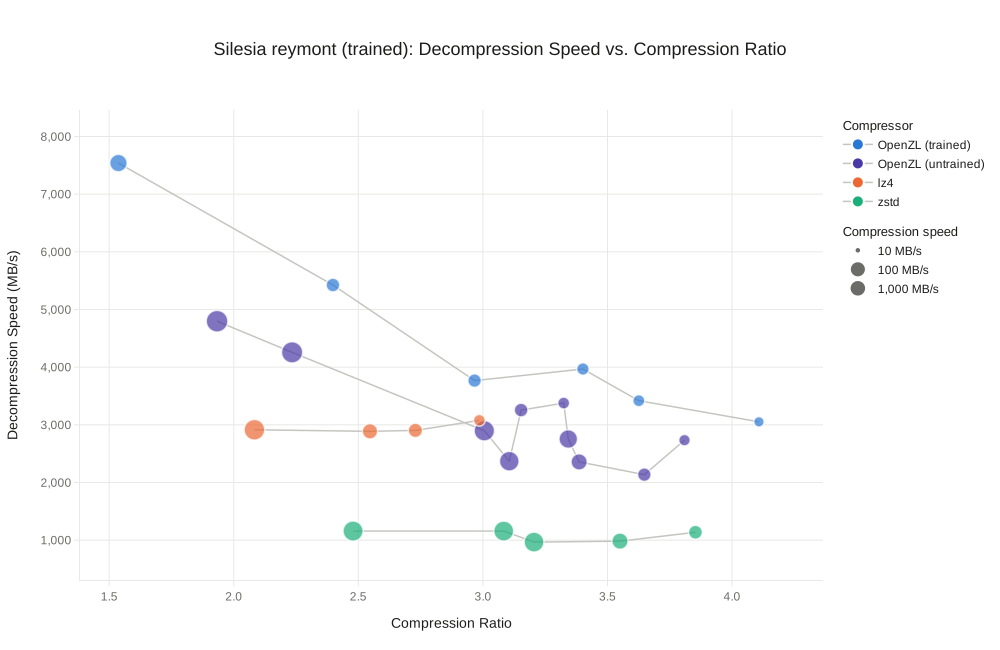
Details
| Compressor | Compression Ratio | Compression Speed (MB/s) | Decompression Speed (MB/s) |
|---|---|---|---|
| OpenZL trained | 1.54 | 153 | 7,539 |
| OpenZL trained | 2.40 | 61 | 5,424 |
| OpenZL trained | 2.97 | 59 | 3,767 |
| OpenZL trained | 3.40 | 46 | 3,968 |
| OpenZL trained | 3.63 | 41 | 3,418 |
| OpenZL trained | 4.11 | 28 | 3,052 |
| OpenZL clvl=-3 | 1.93 | 424 | 4,797 |
| OpenZL clvl=-1 | 2.23 | 383 | 4,257 |
| OpenZL clvl=1 | 3.01 | 314 | 2,897 |
| OpenZL clvl=2 | 3.11 | 259 | 2,369 |
| OpenZL clvl=6,dlvl=1 | 3.15 | 62 | 3,256 |
| OpenZL clvl=7,dlvl=1 | 3.32 | 40 | 3,377 |
| OpenZL clvl=3 | 3.34 | 199 | 2,754 |
| OpenZL clvl=5 | 3.39 | 114 | 2,357 |
| OpenZL clvl=6 | 3.65 | 59 | 2,136 |
| OpenZL clvl=7 | 3.81 | 36 | 2,734 |
| Zstd lvl=-3 | 2.48 | 290 | 1,158 |
| Zstd lvl=1 | 3.08 | 279 | 1,158 |
| Zstd lvl=2 | 3.21 | 272 | 967 |
| Zstd lvl=5 | 3.55 | 113 | 983 |
| Zstd lvl=7 | 3.85 | 64 | 1,137 |
| LZ4 lvl=1 | 2.08 | 334 | 2,914 |
| LZ4 lvl=2 | 2.55 | 92 | 2,887 |
| LZ4 lvl=3 | 2.73 | 71 | 2,903 |
| LZ4 lvl=5 | 2.99 | 39 | 3,078 |
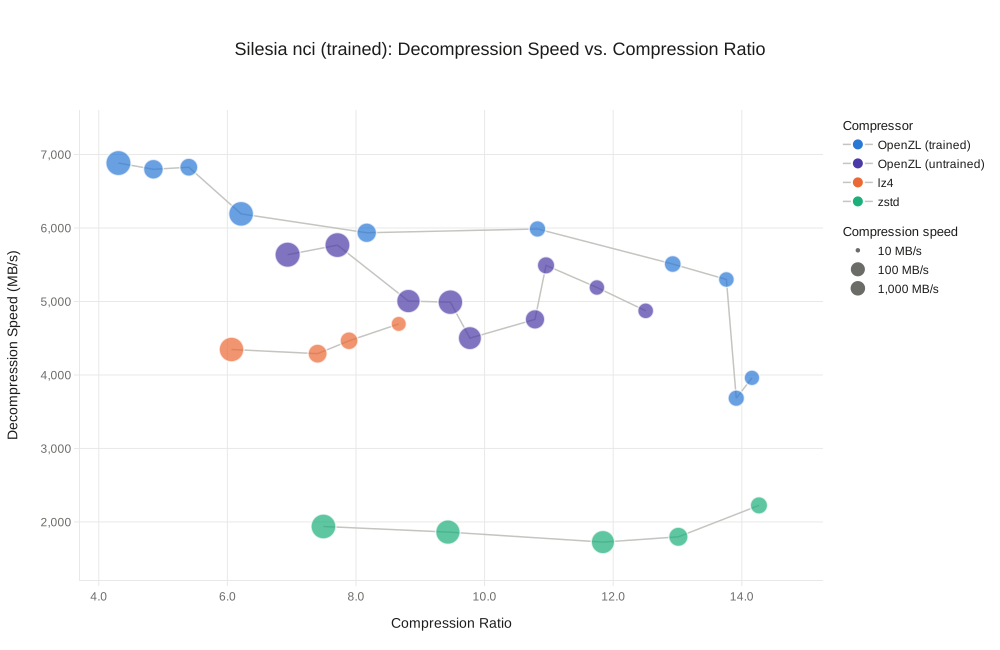
Details
| Compressor | Compression Ratio | Compression Speed (MB/s) | Decompression Speed (MB/s) |
|---|---|---|---|
| OpenZL trained | 4.31 | 1,015 | 6,884 |
| OpenZL trained | 4.85 | 274 | 6,799 |
| OpenZL trained | 5.40 | 182 | 6,827 |
| OpenZL trained | 6.21 | 946 | 6,192 |
| OpenZL trained | 8.17 | 264 | 5,935 |
| OpenZL trained | 10.82 | 128 | 5,987 |
| OpenZL trained | 12.93 | 139 | 5,509 |
| OpenZL trained | 13.76 | 107 | 5,299 |
| OpenZL trained | 13.91 | 124 | 3,683 |
| OpenZL trained | 14.16 | 100 | 3,961 |
| OpenZL clvl=-3 | 6.94 | 1,043 | 5,636 |
| OpenZL clvl=-1 | 7.71 | 986 | 5,767 |
| OpenZL clvl=3,dlvl=1 | 8.82 | 685 | 5,006 |
| OpenZL clvl=1 | 9.47 | 911 | 4,990 |
| OpenZL clvl=4 | 9.77 | 629 | 4,501 |
| OpenZL clvl=5 | 10.78 | 258 | 4,757 |
| OpenZL clvl=6,dlvl=1 | 10.96 | 153 | 5,491 |
| OpenZL clvl=7,dlvl=1 | 11.75 | 104 | 5,190 |
| OpenZL clvl=7 | 12.50 | 109 | 4,873 |
| Zstd lvl=-3 | 7.49 | 955 | 1,938 |
| Zstd lvl=-1 | 9.43 | 855 | 1,862 |
| Zstd lvl=3 | 11.84 | 655 | 1,726 |
| Zstd lvl=5 | 13.01 | 247 | 1,798 |
| Zstd lvl=7 | 14.27 | 153 | 2,225 |
| LZ4 lvl=1 | 6.06 | 921 | 4,347 |
| LZ4 lvl=2 | 7.40 | 232 | 4,290 |
| LZ4 lvl=3 | 7.89 | 175 | 4,465 |
| LZ4 lvl=5 | 8.67 | 94 | 4,695 |
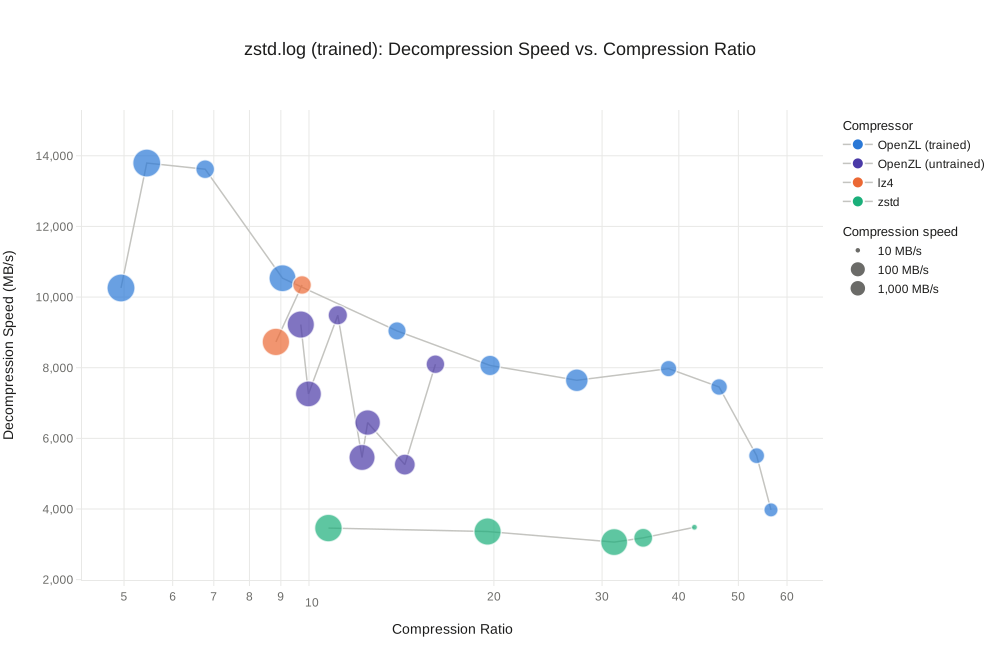
Details
| Compressor | Compression Ratio | Compression Speed (MB/s) | Decompression Speed (MB/s) |
|---|---|---|---|
| OpenZL trained | 4.94 | 2,433 | 10,257 |
| OpenZL trained | 5.44 | 2,138 | 13,794 |
| OpenZL trained | 6.78 | 215 | 13,620 |
| OpenZL trained | 9.06 | 1,587 | 10,534 |
| OpenZL trained | 13.91 | 191 | 9,042 |
| OpenZL trained | 19.72 | 323 | 8,064 |
| OpenZL trained | 27.29 | 556 | 7,644 |
| OpenZL trained | 38.49 | 122 | 7,974 |
| OpenZL trained | 46.51 | 130 | 7,454 |
| OpenZL trained | 53.55 | 109 | 5,509 |
| OpenZL trained | 56.51 | 72 | 3,975 |
| OpenZL clvl=-3 | 9.70 | 1,690 | 9,222 |
| OpenZL clvl=2,dlvl=1 | 9.98 | 1,221 | 7,258 |
| OpenZL clvl=6,dlvl=1 | 11.14 | 250 | 9,486 |
| OpenZL clvl=1 | 12.20 | 1,280 | 5,459 |
| OpenZL clvl=2 | 12.46 | 1,104 | 6,447 |
| OpenZL clvl=5 | 14.32 | 365 | 5,257 |
| OpenZL clvl=6 | 16.06 | 209 | 8,099 |
| Zstd lvl=-3 | 10.76 | 1,817 | 3,460 |
| Zstd lvl=-1 | 19.53 | 1,693 | 3,362 |
| Zstd lvl=1 | 31.39 | 1,568 | 3,063 |
| Zstd lvl=7 | 35.00 | 227 | 3,184 |
| Zstd lvl=19 | 42.41 | 1 | 3,483 |
| Lz4 lvl=1 | 8.83 | 1,772 | 8,730 |
| Lz4 lvl=5 | 9.74 | 210 | 10,342 |
How to Use It
CLI
You can use the LZ engine from the zli CLI by selecting the lz profile. For example, to benchmark compression levels 1 and -1 on data in the $SAMPLE_DIR directory, you can run:
In order to train the Pareto frontier of LZ compressors for your data, you can run:
It will produce a set of compressors in $OUTPUT_DIR together with benchmark.csv describing the performance of each compressor.
API
The LZ compressor can be used via the API by using ZL_GRAPH_LZ in C and openzl::graphs::Lz in C++.
Highlights
The LZ engine has been rewritten from the ground up to maximize performance, and there are many optimizations that are worth discussing; however, we will select two to highlight in this post: a novel offset encoding scheme developed by us, and a novel Huffman encoding layout from the community. Future posts will go over the rest of the LZ decoder, and expand on the offset encoding scheme summarized here.
Offset Encoding
The result of an LZ parse is 4 output arrays:
- literals: Bytes that can't be replaced with a reference
- literal lengths: How many literals to emit
- match lengths: How long the match is
- offsets: How far back the match is
To decode sequence i, the LZ decoder first copies literal_lengths[i] bytes from the literals buffer to the output buffer, then copies match_lengths[i] bytes from the output buffer from offsets[i] bytes ago.
One of the major expenses in LZ is encoding and decoding the offsets, both in terms of the compressed size and the decoding speed. These are also the trickiest part of the LZ parse to encode, as they are typically 32-bit integers, and unlike the literal lengths and match lengths, which are typically very small and nearly always fit in a byte, offsets have a much wider range of values.
Zstandard breaks offsets up into their power of two and emits a tuple (power-of-two, remainder) per offset, where the power-of-two is encoded using FSE and the remainder is encoded using the minimum number of bits.
OpenZL uses a novel scheme that dynamically partitions offsets into 16 or 32 buckets using a V-optimal histogram algorithm, and emits a tuple of (bucket-id, position-in-bucket) per offset, where bucket-id is bitpacked using 4 or 5 bits depending on the number of buckets, and position-in-bucket is encoded using the minimum number of bits based on the size of the bucket it falls into.
This allows OpenZL to encode offsets without using any entropy codec, which offers 2x to 3.5x faster offset decoding with only a small loss in compression ratio.
PivCo Huffman
PivCo Huffman is a new Huffman layout by Marcin Żukowski that allows for significantly faster decoding speeds by leveraging SIMD code. It offers 2-3x faster decompression compared to OpenZL's current Huffman implementation at similar compression speeds. The v0.3.0 release of OpenZL includes an implementation of PivCo Huffman, and enables it by default in the LZ engine.
For a brief intuition, a figure from the paper is included below. Traditional Huffman lays out the bits as shown at the top of the image. PivCo Huffman stores a bitmap at each internal node of the Huffman tree, then works bottom-up to reconstruct the original data, merging the two child nodes according to that bitmap. Please see the paper for full details.
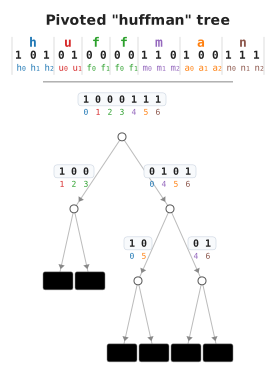
After all the other decompression speed optimizations, Huffman was the only codec that hadn't been optimized, and typically made up over 50% of the LZ decompression CPU. So we were delighted to implement PivCo in OpenZL when Marcin published his paper. Upstream PivCo Huffman has continued to evolve and improve since our implementation, and we expect to both pull in these improvements in future releases and contribute any meaningful ideas back to upstream.
Future Work
While the LZ engine is ready to use today, it is still under active development, and the feature set is expanding every release. OpenZL's format versioning allows us to safely add new features, while preserving the ability to encode and decode in older format versions. In future releases we expect to:
- Expand the compression level support to cover Zstandard's entire compression level range.
- Add support for dictionary compression to improve compression on small data.
- Add repeat offset support to improve compression ratio in certain scenarios.
- Expand the set of backend compression graphs that are supported and searched for by the LZ trainer.
Please try it out and submit any feedback or feature requests to our issues board!